Wiki







Sales Quote
Sales Quote provides the prospective customer with a quote of how much a product or service would cost. With this function, a manager can handle Sales Order and Sales Invoice. Sales Quote can also be used in kpi.com as part of Sales and Projects Modules. It can be sent to contacts, leads, accounts and customers. Project Managers can use Sales Quotes in order to create proposals and send them to clients before the start of the project
To create a Sales Quote, go to Accounts>>Accounting>>Sales Quote and click on plus icon. Fill in the form.
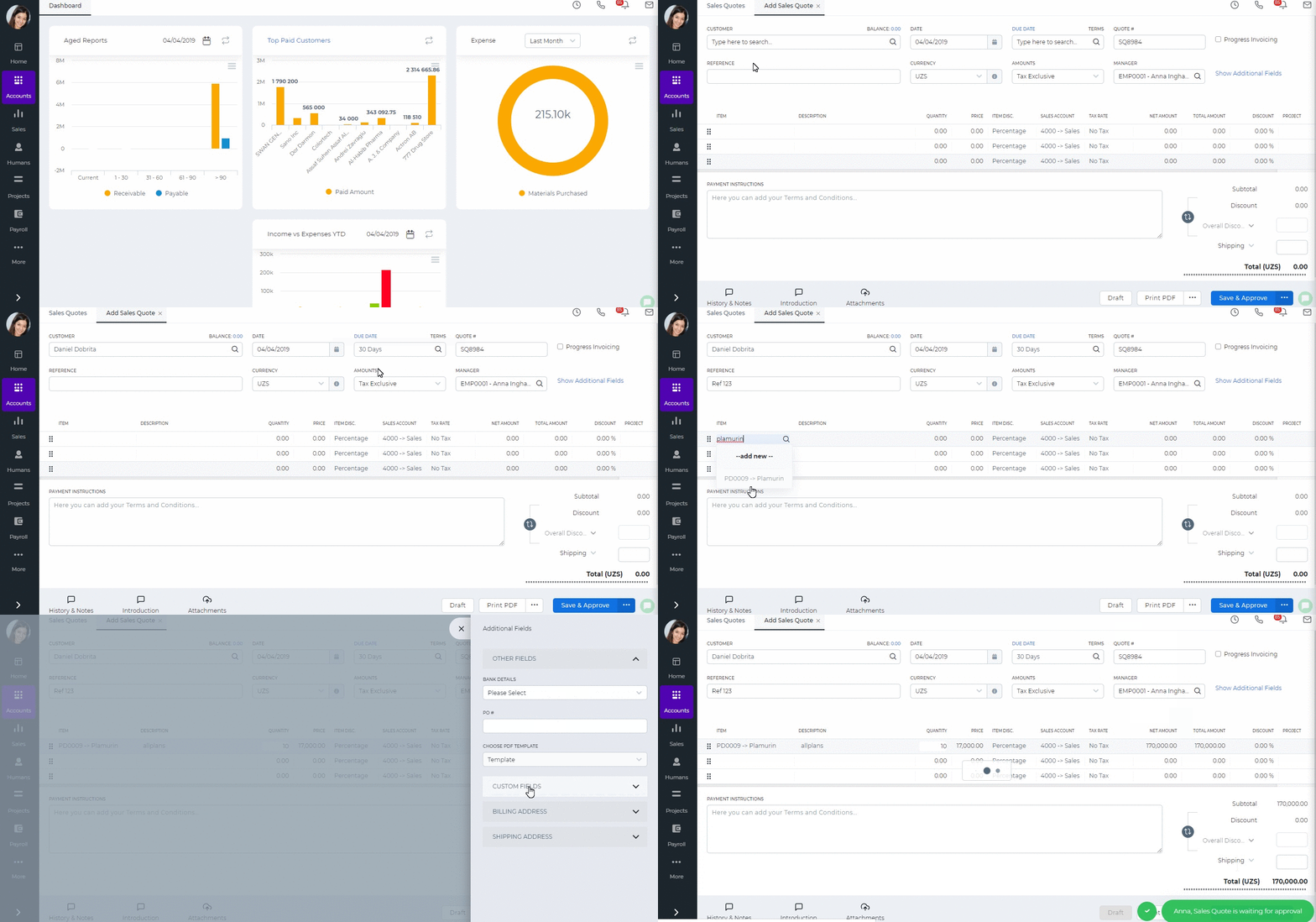
After you have filled in the quote form, you can:
- Save as a Draft – you will be able to edit the quote later again. The status of the quote changes to “Draft”.
- Save & Approve – if you have enough rights, you can choose yourself in the Manager field and approve the quote yourself. The status of the quote changes to “Approved by Manager”.
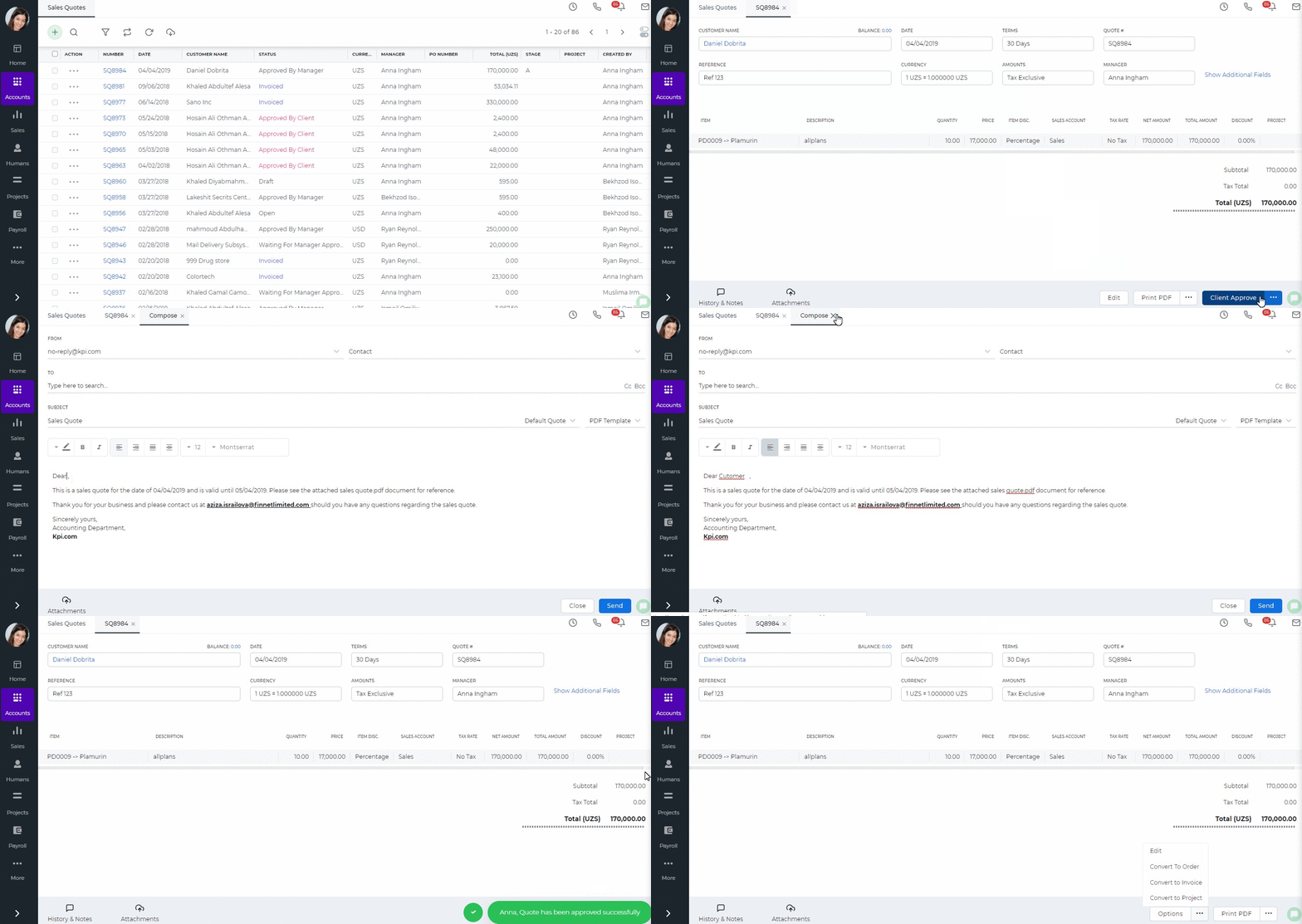
- Approve & Email – when you click Approve & Email Sales Quote will be approved and you will be able to send the quote as an email with the PDF version attached. The status of the quote changes to “Open” after you have emailed the client.
- Submit for Approval – you can submit Sales Quote for manager’s approval by choosing manager in Manager field. Managers who can approve Sales Quote are Administrators, Directors and Accountants. The status of the quote changes to “Waiting for Manager’s approval”.
- Print PDF Version – You can view how the final quote look by printing the PDF.
- Client Approve – Once you receive quote approval from your customer, you will be able to change the status to “Approved by Client” by clicking the Client Approve button.
- Client Reject – If the client has rejected the quote, you can change the quote terms and send the quote back to the client later. The status of the quote changes to “Rejected”.
- Convert to Order – Once the quote is approved by the customer, you can convert your quote to sales order using Convert to Order button.
- Convert to Invoice – Once the quote is approved by the customer, you can convert your quote to sales invoice using Convert to Invoice button. The status of the quote changes to “Invoiced” after you have converted.
Progress invoicing – (also called progress billing, percentage of completion billing, or partial billing) Progress Invoicing enables you to create an invoice from a sales quote by billing your customer for a percentage of the original quote.
In order to generate Progress Invoicing go to the Sales Quote Add Form and tick Progress Invoicing on right-top. For more detailed information click here.
Created by Aziza Israilova
April, 2019
See also
- Purchase Order for Fixed Assets
- Goods Delivered Notes
- Sales Order
- Sales Invoice
- Recurring Invoice
- Request for quote
- Request for purchase
- Purchase Order
- Purchase Invoice
- Recurring Bills
- Fixed Assets
- Company Expense Claims
- Employee Expense Claims
- Customer Center
- Supplier Center
- Products & Services Overview
- Bank Accounts
- Supplier Access
- VAT Reverse Charge Mechanism
- Setting Barcode for a Product
- Items Table
- Run Time Calculation of Exchange gain/loss
- Exporting to Excel and PDF
- Timesheet Invoice
- Budget per Department
- VAT Return
- Bank reconcilation
- Dividends Payable
- Assembly Products
- Add New Assembly Item
- What is Non-Inventory Item?
- Add New Non-Inventory Item
- FIFO method of inventory valuation
- What is Inventory Item?
- Add New Inventory Item
- Products/Services Import
- Add New Product/Service
- Intercompany Purchases
- Creating Intercompany Sales Invoice
- Intercompany Sales
- Workflow of Expense Claims
- Purchases / Bills Overview
- Timesheet based Invoice
- Progress Invoicing
- How to convert Sales Quote to Order, Invoice & Project
- Sales Overview
- Serial Numbers
- Accounting Overview
- Landing Cost
- Mark PO as Open
- Purchase Order Actions
- Receive Purchase Order
- Send Purchase Order
- Importing Customer Accounts